Skip to content

RestoCraft Booking

Start with a booking. Connect the whole guest visit.

Online bookings, table selection, guest self-service and a clear overview for the shift. One journey from the first click to the next visit.
Reservations · Rollout with our team

Interactive examples on this page · nothing is sent

Arrange a demo of your booking process
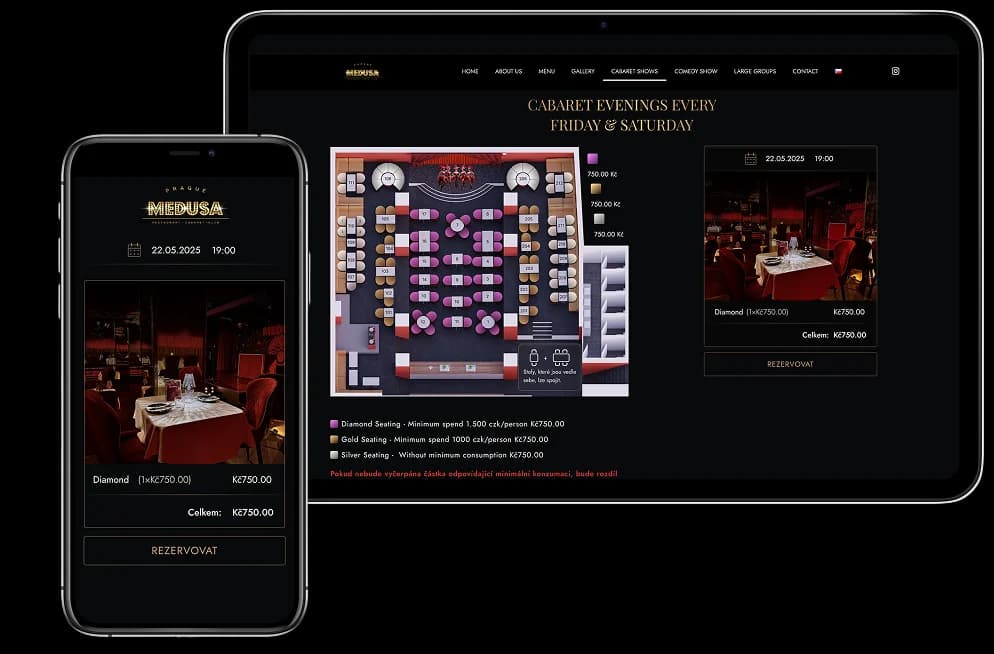
Seat selection and category-based booking prices on a tablet and phone
ReservationConfirmed

Anna NovotnáVIP

  1. Fri 25 Sep · 19:004 guests
  2. Table T3 · main hallhold
  3. Birthday · quieter tablefor the shift
  4. Relationship after the visitcontinues
One reservation · the whole scenario

One journey from the click to the next visit

  1. The guest booksDate, time, party size and, where relevant, a table
  2. The system holds capacityA temporary hold protects the selection during checkout
  3. The shift receives the contextStatus, table and visit notes
  4. The relationship continuesCRM, reviews and loyalty

How would you like to take bookings?

Different venues. One booking system.

Choose a scenario to see how the guest journey, table allocation and online booking process adapt to your restaurant.

Simple booking

Guests choose the date, time and party size. The restaurant allocates the table.

A short booking journey for an everyday restaurant. Guests see available times without a floor plan or extra decisions.

  1. Date
  2. Guests
  3. Time
  4. Contact
  5. Confirmation
  • A short guest journey
  • The restaurant controls seating
  • No floor plan or extra steps
  • Reservation form
  • Real-time availability
booking.restocraft.demoInteractive example
ReservationMaison RestoCraft · example
Date
Party size
4 guests
Time

Table reservation

Maison RestoCraft

Date
Fri 25 Sep
Time
19:00
Guests
4
NameAnna Novotná
Phone+420 000 000 000
The restaurant assigns the table

Current exampleSimple · Fri 25 Sep · 19:00 · 4 guests
Interactive example · nothing is submitted

Want to see reservations for your own venue? We will show them on your real process.

Request a demo

A floor plan that works with your bookings

Tables, zones, combinations, blocks and occupancy over time.

The same restaurant layout supports simple bookings, automatic allocation and guest table selection.

  • Tables, zones & hallsmain room, terrace, bar, VIP
  • Occupancy board · Holds & blocksavailable, held, booked, blocked
Main hall · Friday 25 Sep
  • Free 2
  • Hold 1
  • Reserved 2
  • Blocked 1

T3 Reserved · Anna Novotná · 4 guests · birthday · 19:00–20:30

What happens on the restaurant's side?

The guest's booking becomes context for the shift.

The same booking appears in the operational overview with its status, table and visit requirements.

Guest
Reservation confirmedMaison RestoCraft

Fri 25 Sep · 19:00 · 4 guests

Table
assigned by the restaurant
Manage the reservation
A reminder before the visitAccording to the booking status and restaurant settings.

The guest sees a confirmed booking.

Shift
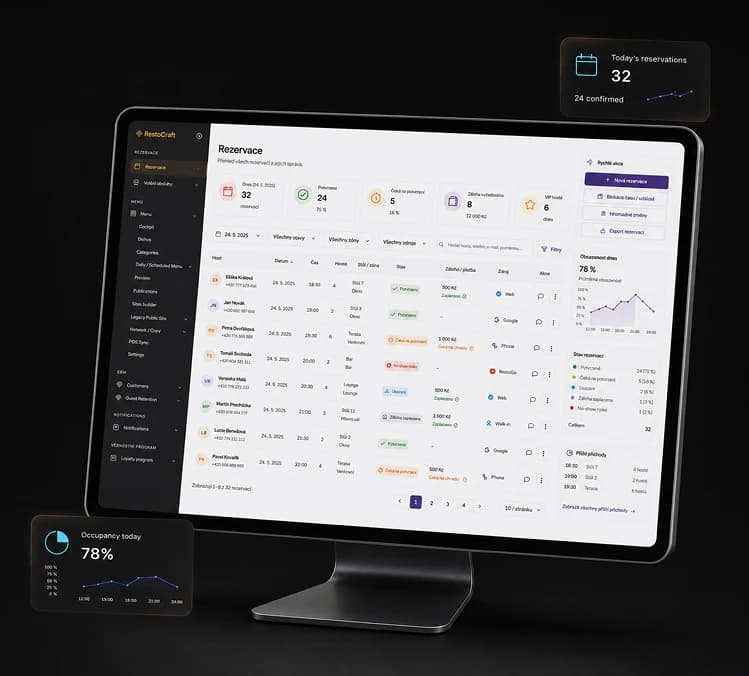
Example booking overview with statuses, deposits and booking sources
An illustrated overview using example data
Next 90 minutes12 reservationsin the sample overview
19:00 · arrivalAnna Novotná · 4 guests
Confirmed
  • assign a table
  • Birthday

Prefers a quieter table.

The team sees the operational context.

This is where Booking becomes part of restaurant operations.

  • Reservation operations
  • Occupancy board

Fewer follow-up phone calls

Guests can manage their bookings securely.

Changing or cancelling a booking need not require a phone call. Available self-service actions respect the restaurant's rules and the booking status.

Manage reservationAnna NovotnáConfirmed
Friday
25 Sep
Time
19:00
Guests
4

Choose a change on the phone and see what Booking checks.

  1. The guest requests a changewithout access to administration
  2. Booking checks the rules againcapacity, time, tables and payments
  3. Only permitted changes are confirmedotherwise staff handle the request

Each change depends on current availability, restaurant rules, payment status and the booking scenario. This demo changes no real booking.

  • Guest booking management

A booking starts a relationship

After the visit, Booking connects with CRM, communication, reviews and loyalty.

The visit becomes part of the wider Restaurant OS.

  1. Reservations
  2. Guest CRM
  3. Reviews & Reputation
  4. Loyalty
How the loyalty programme works
  1. Booking18:31 · Booking confirmed

    25 Sep · 19:00 · 4 guests

  2. Reminder10:00 · A reminder before the visit

    According to the booking status and restaurant settings.

Scenarios for real restaurants.

Choose a venue type and see how the journey changes.

Combine different booking scenarios to suit the way your restaurant works.

Everyday restaurant

A simple booking without unnecessary steps.

Guests choose a time and party size. The restaurant manages seating.

  1. Simple booking
  2. No payment
  3. The team controls seating
  4. Confirmation
Scenario
A short booking journey
Payment
No online payment
Tables
Managed by the team
  • Reservation form
  • Real-time availability

Connected capabilities

One booking lifecycle connects it all.

These capabilities connect the Booking system with the Table and Zone Plan module.

Booking

Reservation form · Real-time availability

Date, party size, duration, opening rules, current availability and booking confirmation.

Tables

Floor-plan editor · Tables, zones & halls · Guest table selection · Table combinations

The floor plan, zones and tables used by bookings and the shift team.

Connected module: Floor Plans, Tables & Zones
Holds

Holds & blocks

Temporary capacity holds and operational blocks prevent booking conflicts.

Guest

Guest booking management

View, cancel and reschedule without administration access.

Operations

Reservation operations · Occupancy board

Lists, details, statuses, arrivals and walk-ins for the shift.

Connected module: Floor Plans, Tables & Zones
Communication

Confirmations & reminders

Confirmations and reminders connected to the booking's actual status.

FAQ

Questions before getting started.

The booking journey is configured for your venue, tables, payments and integrations.

Ask your own question

Do guests have to choose a specific table?

No. Choose a simple booking journey, or let guests select a table on the visual plan where the scenario supports it.

How can packages and gifts fit into a booking?

The example shows how extras can fit into the guest journey. We will discuss the available setup and suitable packages for your restaurant during the consultation.

RestoCraft Booking

Show us how bookings work at your restaurant.

A simple form, table selection, deposits or events? We will review your process and show a scenario suited to your venue.

  • No obligation
  • Your actual process
  • Czech team

Booking workflow demo

A demo based on your booking process

We will focus the demo on the scenarios your restaurant needs.

  • Simple form
  • Table selection
  • Deposits
  • Events
  • Website integration
Request a demo
Reservations

Give guests a direct booking path while keeping restaurant teams in control of operations.

Rollout
Rollout with our team
Pricing
Subscription
This product is introduced with hands-on implementation support.