Reservations12 min read
Letting Guests Choose Their Table When Booking Online: When It Makes Sense
A guest choosing a specific table is not the same as the team or the system assigning one, nor as combining tables for a group.
For owners and operations managers setting up online bookings and considering a floor-plan map.
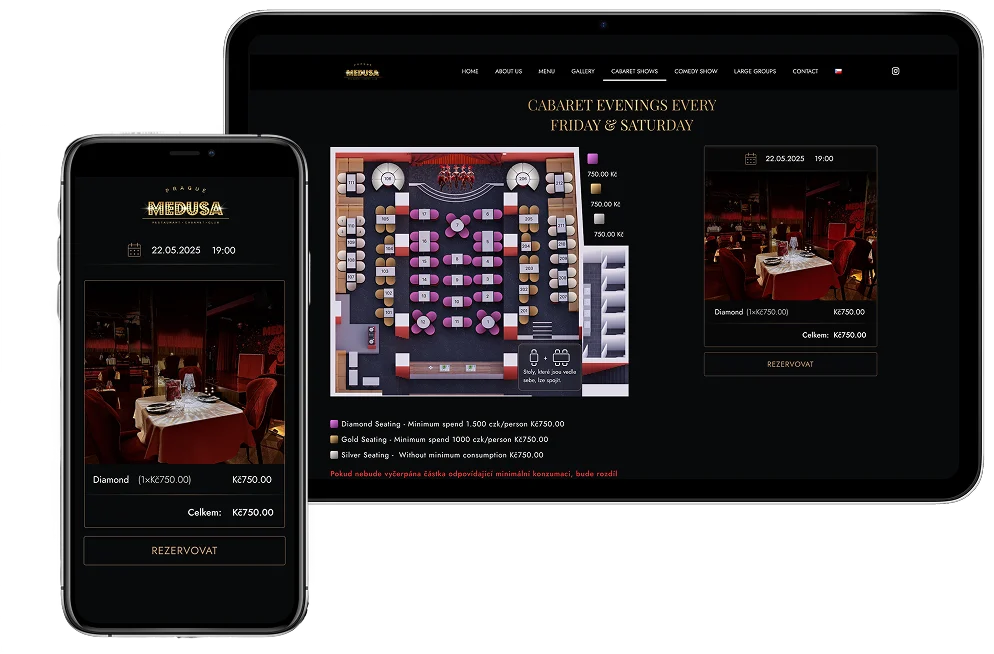
Letting guests pick a specific table on a floor plan when they book online makes most sense where the seat is part of the reason for the visit: a window table with a view, a booth for two, the terrace, a seat by the open kitchen or near the stage. In a restaurant where the tables are much alike and the evening turns quickly, a simple booking usually works better: the guest enters the date, time and party size, and the team decides the table. This guide is for owners and operations managers setting up online bookings. It explains how guest table selection differs from table assignment and table combining, shows when a map pays off and how to prepare it, and covers what the team on shift has to watch so that the promise of a specific table can be kept.
Choosing, assigning and combining tables differ
Online bookings are often discussed as ‘table management’, as if it were one feature. In fact there are three separate decisions. Each promises the guest something different and puts a different load on the floor team.
- Guest table selection: the guest sees the floor plan while booking and chooses a specific physical table. The restaurant promises they will sit exactly there.
- Table assignment: someone other than the guest decides the table, either the manager or host before the shift or at the door, or the system according to preset rules. The guest doesn't know the table in advance and the restaurant keeps its flexibility.
- Table combining: one booking takes several tables at once, typically for a larger group. It has its own rules for capacity and clashes and deserves an article of its own.
The modes can be combined. A guest may choose a terrace table and, in an exceptional situation, still be offered another one. What matters is that for every booking the restaurant knows which mode applies. A guest who picked table 12 arrives with different expectations from one whose table was assigned by the host.
Guest table selection, team assignment and automatic assignment
| Criterion | Guest chooses the table | Team decides the table | Automatic assignment |
|---|---|---|---|
| What the guest sees when booking | The floor plan and available tables | Date, time and party size | Date, time and party size |
| What the restaurant promises | A specific table | A place for the party size | A place for the party size |
| Work for the floor team | Fewer decisions, more promise-keeping | Allocating tables before the shift or at the door | Checking the result and handling exceptions |
| Flexibility for changes | Lower; moving the guest needs explaining | High | Depends on how well the rules describe the room |
| Main risk | The chosen table isn't free or ready in time | The guest doesn't get the seat they wanted | The rules don't match the reality of the evening |
| When it fits | Tables clearly differ and the seat is part of the experience | Similar tables, fast turns, a smaller room | Many bookings and a stable, well-described room |
When a table map pays off
The key question isn't whether a map looks modern, but whether it helps the guest make a decision they would otherwise make by phone. Table selection makes sense especially when:
- Tables clearly differ: a view, a window, the terrace, a booth, a private room, a seat at the bar or by the open kitchen.
- Guests already ask for specific seats, by phone, by e-mail or in the booking notes.
- The visit has a special reason, such as an anniversary or a business dinner, and the guest wants to know where they'll sit.
- The room has a fixed layout that doesn't change from day to day, so the map matches reality.
- The restaurant runs evenings where the view of the stage or the kitchen is the main part of the experience.
Where tables are alike, guests are often moved and staff need to build the room around whoever walks in, table selection tends to get in the way. The guest takes an extra step for no benefit, and the restaurant loses flexibility it needs on a full night. A weather-dependent terrace is another problem: if you only decide on the day whether it opens, promising a specific outdoor table online is risky.
A common compromise is to offer selection in only part of the room. Guests can pick window and terrace tables, while the team assigns the rest. Whether a particular booking system supports such a split needs checking during set-up. As a rule, the smaller and more stable the selectable part of the room, the easier the promise is to keep.
What guests should see on the map
A booking map is not a copy of the technical floor plan. Guests need to understand quickly where they will sit, and must not be able to choose something that makes no sense.
- Only tables that make sense. After entering the date, time and party size, guests should see only tables that are free at that time and fit their group. A table for two for a party of six, or a table booked by someone else an hour later, doesn't belong in the offer.
- Clear names. Next to the internal table number, a description guests understand helps: ‘by the window’, ‘shaded terrace’, ‘booth by the bar’.
- Differences that affect the choice. Steps, a seat near the entrance, a louder area by the bar, bar stools instead of regular seating. Guests who know in advance get fewer unpleasant surprises at the door.
- A clear status. Free, temporarily held and occupied tables must be distinguishable not only by colour but also by text or a symbol.
- Readable on a phone. The map has to work on a narrow screen and with a finger. Small tables that are hard to tap lead to wrong choices.
Think also about guests who can't or don't want to use a map. The W3C's Web Content Accessibility Guidelines (WCAG) say that non-text content should have a text alternative serving the equivalent purpose (success criterion 1.1.1) and that all functionality should be operable through a keyboard (success criterion 2.1.1). In practice, offer a list of available tables with descriptions next to the map, or the option to book without choosing a specific seat.
Temporary table holds and booking clashes
Once a guest clicks a table, the most sensitive part of the journey begins. Before they enter their details and confirm, someone else may choose the same table. The system therefore needs to hold the table briefly: while the booking is being completed, it isn't offered to others, and if the guest doesn't finish, the table is released when the time runs out. This is usually called a hold.
The second source of clashes is everything that happens outside online booking: a phone booking written in a diary, a walk-in seated at a table that is booked in an hour, or a table taken out of use because of a broken heater. An online map is only reliable when all these changes happen in the same system. If the team needs to take a table out of the offer, it should block it in the system, not just remember it.
How to prepare the floor plan for online selection
Table selection is only as good as the preparation behind it. Go through these steps before launch, ideally with someone who knows the room from evening service.
- Map the room as it really is. Every table with its minimum and maximum covers, its zone and whether it is usually moved.
- Decide which tables go online. Not every table has to be selectable; you can keep part of the room for walk-ins and for moving guests.
- Name tables for guests. A short description of the spot next to the internal number.
- Describe the differences. The view, steps, closeness to the bar, outdoor seating and what happens in bad weather.
- Set the booking length. For tables guests choose, allow time to clear and reset between two visits.
- Write down the reseating rules. When the team may move a guest, who decides and how the guest is told.
- Book as a guest. On a phone, for different party sizes and for a slot that is almost full.
- Train the shift. Where staff can see that a guest chose the table themselves, and what to do when the table isn't ready.
The floor plan also changes over time: winter and summer layouts, a terrace, a new booth. Decide who updates the plan and when; otherwise, after a few months the map drifts away from reality and guests pick tables that aren't in the room.
A promised table and the evening shift
Bookings with a chosen table change the work at the door. Instead of building the room around arrivals, the host makes sure the chosen tables are free and ready in time. Plan for these situations in advance:
- The previous guests linger. A buffer between bookings and the option to offer waiting guests a seat at the bar help more than improvising at the door.
- The group arrives larger. A table for two can't simply be expanded. The person in charge of the shift decides on moving the group based on the current state of the room.
- The weather closes the terrace. The rule ‘in bad weather we'll seat you inside’ belongs in the booking confirmation, not in an apology at the door.
- The table is out of use. If you know about the problem in advance, tell the guest before the visit.
The general rule: the firmer the promise, the earlier the guest should hear about a change. With a booking without table selection, the guest won't even notice being seated elsewhere. With a chosen table they will, and if they only learn at the door, it feels like a broken promise.
How RestoCraft Booking handles table selection
In the RestoCraft booking system, guests don't have to choose a specific table. Depending on the configuration, the path can be simple, with the guest choosing the date, time and party size and the restaurant handling the table internally, or the guest picks a table on a visual floor plan where the scenario supports it. The plan shows guests only tables that make sense for the chosen time, party size and current availability, and the chosen table can be held temporarily while the booking is completed.
Tables, zones and rooms, such as the main dining room, terrace, bar or VIP area, are managed in the connected Floor Plans, Tables & Zones module. It includes a plan editor and an occupancy overview for the shift with the statuses free, held, booked and blocked. Bookings then appear in the operations overview with their status, table and visit requests. Guests can view or cancel their booking or change its date and time. RestoCraft doesn't list changing the table or the party size among its verified self-service steps, so staff handle those.
Two things RestoCraft does not yet present as verified features: automatic table assignment in the guest's online journey, and table combinations, whose exact operational behaviour is still being verified. The scope of the floor plan and the booking scenario for your venue are set up during onboarding with the RestoCraft team.
Frequently asked questions
No. Table selection is the restaurant's decision, not an obligation. Many places offer it only in part of the room or for certain dates and leave the decision to the team elsewhere. In RestoCraft, depending on the configuration, you use a simple path without a map, or table selection where the scenario supports it.
Usually not. If the tables are similar and guests change every hour, the map adds a step that gives the guest nothing and takes flexibility away from staff when seating. An exception may be a few distinctly different seats, such as a counter with a view into the kitchen.
No. With selection, the guest decides while looking at the floor plan. With automatic assignment, the system decides according to rules and the guest doesn't know the table in advance. Each mode promises the guest something different and loads the shift differently.
Key takeaways
Guest table selection, table assignment and table combining are three different decisions.
A map pays off where tables clearly differ and the seat is part of the experience.
Guests should only see tables that fit the time, party size and availability.
A temporary table hold stops two guests getting the same table.
Phone bookings, walk-ins and blocked tables must all live in the same system.
A chosen table is a promise; tell the guest about any change as early as possible.
Conclusion
Interactive table selection won't make a restaurant more modern on its own. It is a tool for venues where it gives guests what they would otherwise arrange by phone, and where the team can keep the promise of a specific seat. Start with a small, stable part of the room, handle clashes in one place, and after a few weeks check whether guests ask about tables less often and whether there is less reseating at the door. If larger groups are your main headache, continue with table combining; it also pays to understand how a booking system works as a whole, from the booking form to the shift.